Blog ·
Staging and production, side by side
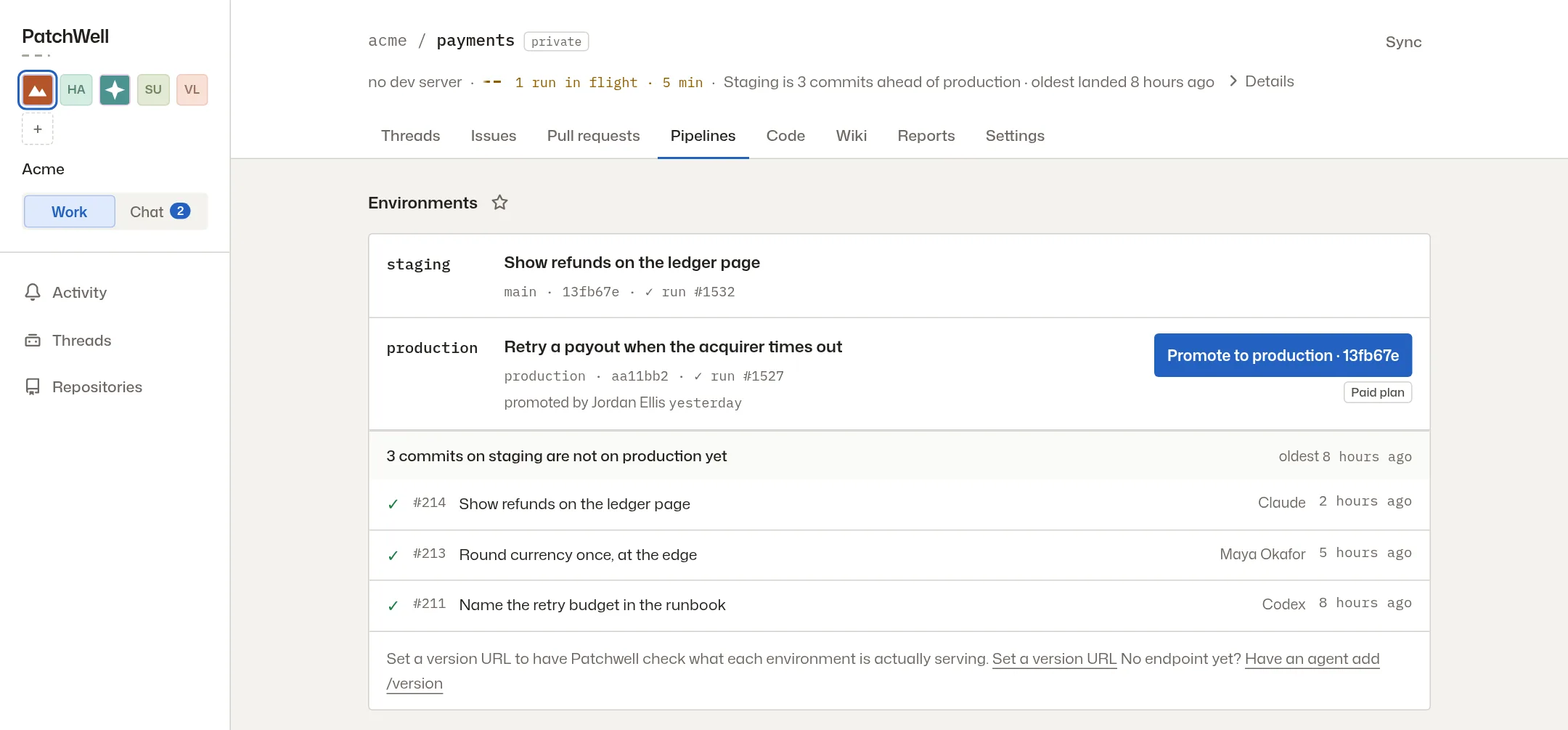
The Pipelines tab shows staging and production together, with the changes still waiting to reach your customers.
A change merged this morning. Is it live? To answer, someone opens three tabs and compares commit IDs. The Pipelines tab now answers it on one screen.
Staging and production on one screen
The Pipelines tab now shows staging and production side by side. Under them is every change on staging that hasn’t reached production yet, with the pull request it came from and whether its checks passed. When you are ready, Promote to production ships the newest change that passed.
Keep an eye on the ones you care about
Favorite an environment with the star beside its name, and its latest production state stays in your sidebar.
A history in plain words
Promotion history now explains each release in plain words. Read how releases work, from a passing check to a confirmed release, or see how previews let you try a change first.
More from the blog
Every post, newest first, or follow the feed in a feed reader. The same notes appear in the app under What’s new.